
How to buy with Kakobuy
A step-by-step guide from product discovery to checking warehouse photos, packing your haul and arranging international shipping.
How to buy your first Kakobuy haul
Keep the product order and the international parcel separate in your budget. The first payment gets items from sellers to the warehouse; shipping your packed parcel is another decision after the items arrive.
Find the listing and check the seller
Browse the Spreadsheet categories or use search. Compare the listing’s measurements, material, colour choices, seller history and return terms. Save the exact listing and variant; a similar photograph is not proof of the same product.
Submit the product link to Kakobuy
Create or sign into your account on Kakobuy. Paste the product link, check the parsed item and choose its options. If the link cannot be read, inspect the requirements of Fill & Buy before using the manual form.
Review the first payment
Confirm the product price, domestic shipping, payment charges and exchange rate shown at checkout. Record what you selected. This is not the complete delivered cost: leave room for international freight, packing choices and any destination charges. Read the fee guide.
Check items as they arrive
Use the warehouse photos to check quantity, colour, size label, visible damage and requested measurements. Ask for a missing angle before approving a parcel. QC photos can show visible condition; they do not establish authenticity or long-term durability. Use the QC checklist.
Select goods and packing
In Warehouse, select the items you want to send together. Check each row’s weight, volume and mail restriction. Review packaging options and consider a rehearsal pack if the packed dimensions affect your decision. Check the storage deadline for each selected order and act before the earliest applicable expiry rather than waiting indefinitely for another seller.
Compare routes and confirm the parcel
Use the current official estimator for your destination and goods type. Check actual and volumetric weight, exclusions, tracking, insurance terms and the full amount due. Confirm the address and declaration details accurately, then track the parcel from your account. Keep the packaging and evidence if something arrives damaged.
Selecting warehouse items for a parcel
The official tutorial highlights the Warehouse menu, item checkboxes and Submit action. Read the Weight(g), Volume(cm³) and Mail Restriction columns before continuing. This is a historical tutorial screen, downloaded 10 October 2026; present account labels may differ.
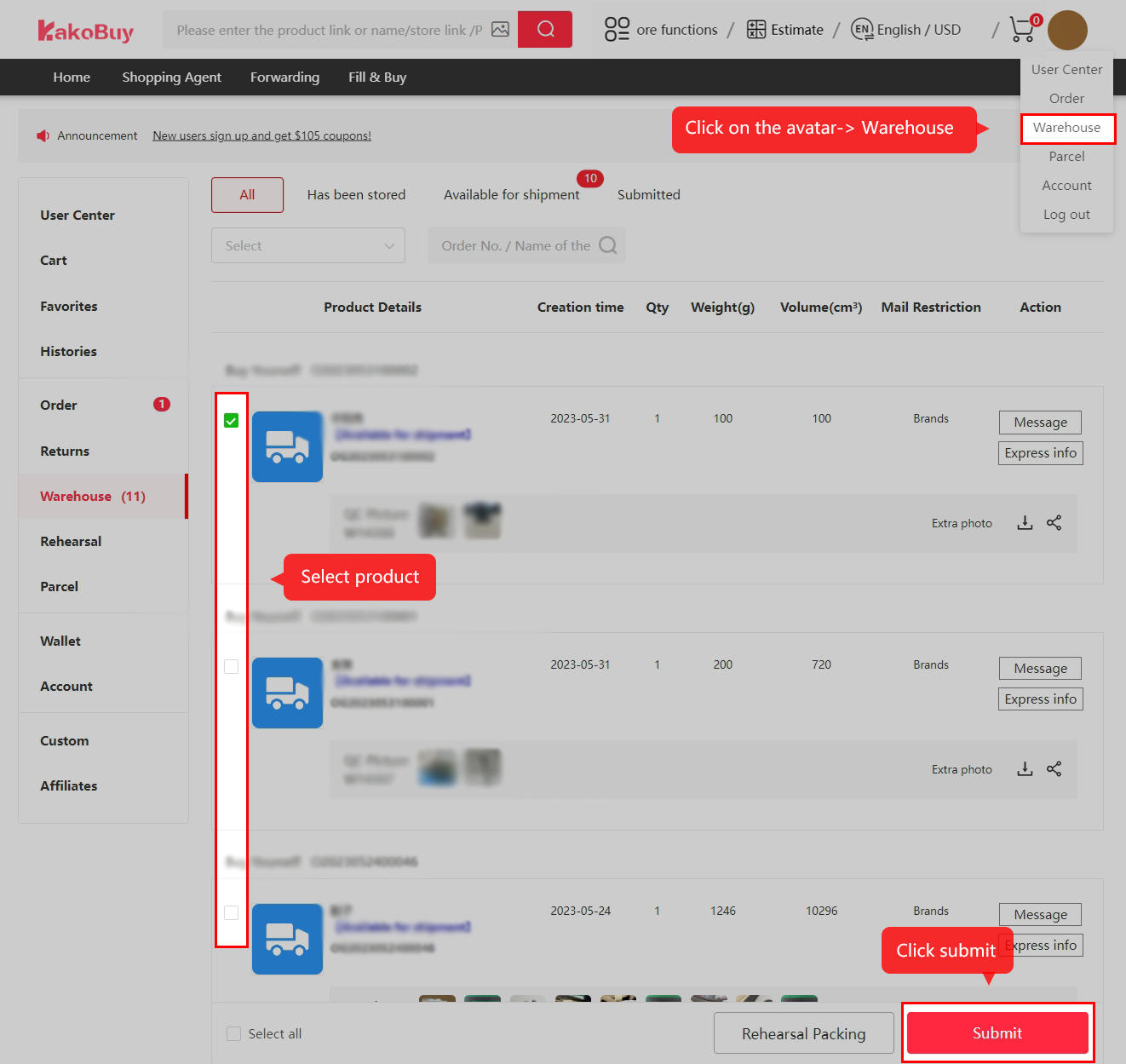
Turn the warehouse rows into a parcel list
Read each selected row back against your saved order: item identifier, variant, quantity, weight and restriction label. If you ordered two sizes of the same design, confirm that both intended rows are selected rather than relying on a similar thumbnail. An item with an unanswered QC question should be resolved before joining the parcel.
Keep the parcel’s packing notes in the same list. “Keep this shoe box” and “remove ordinary packaging from this hoodie” apply to different items. Check the global switches as well as the item-level options in the current screen; one broad change can override an instruction you meant for a single piece.
The historical tutorial makes the hand-off visible: selecting warehouse goods precedes the Submit action. Current route availability, final weight and payment are checked later in your account. The local haul planner helps identify questions from its dated rules; it cannot approve a shipment or reserve a route.
How to use the search and haul planner
For search, enter a product name, brand or item description such as “black cargo pants”. Use one meaningful phrase, then compare listings and variants. The category page is useful when you do not yet have a specific item in mind.
For the haul planner, choose one of four recorded destinations, enter the packed weight in grams and the age of the oldest stored item in whole days. The result compares against a dated rules snapshot. It does not include current route availability, price, contents, parcel dimensions or an account’s actual storage deadline.
Shopping precautions before you pay
Confirm that the agent accepts the product, the chosen route can carry its contents and the seller’s size chart matches your measurements. Battery and liquid restrictions deserve attention before purchase. A low product price may still lead to a high delivered cost if the parcel is bulky. Read item restrictions, customs notes and support options while you can still change the order.