
Track each order’s storage clock
Storage deadlines belong to individual orders. For a multi-seller haul, check each selected order and act before the earliest applicable deadline.
 Fragrance
 Electronics
 Watches
 Bags
What the help centre actually says
The captured storage article distinguishes normal and abnormal packages. The separate extension article describes per-order extensions and post-expiry handling.
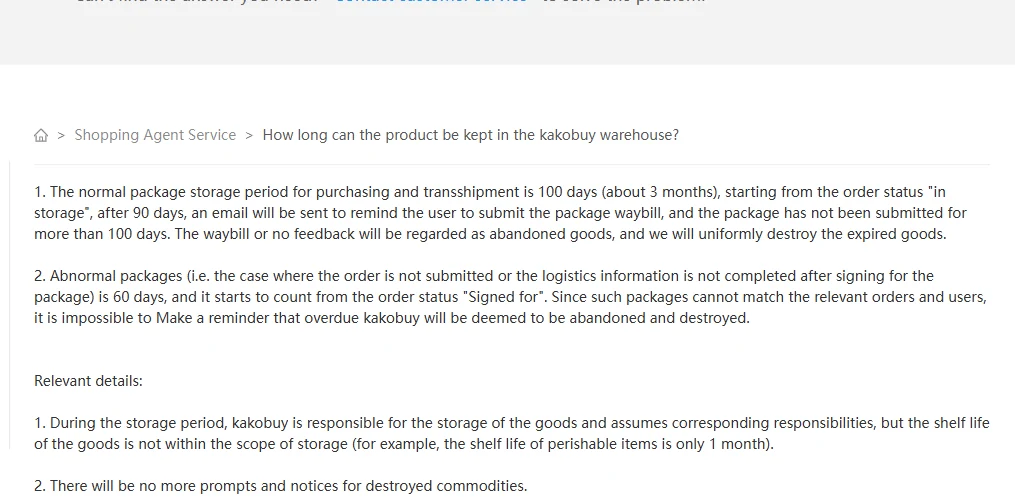
Read the storage allowance together with the extension terms. The articles use different status wording, so check the expiry shown for each order rather than treating a haul as one shared clock.
| Countdown | Runs for | Trigger status | Consequence |
|---|---|---|---|
| Normal packages | 100 days | The order status reading in storage | Article 1 describes overdue disposal; article 120 also describes a post-expiry cooling-off period. Confirm the order’s actual deadline. |
| Reminder | day 90 | The same event | An email reminder described in article 1; do not wait for it before checking the deadline. |
| Abnormal packages | 60 days | The order status reading Signed for | Article 1 describes disposal after expiry and no reminder for unmatched packages. |
| Extension | 30 days at a time | You buying it from the warehouse screen | Billed for the specified OG order. Article 120 separately describes a 30-day post-expiry cooling-off period. |
Why this is the binding constraint on a haul
Each order has its own applicable storage deadline. When sellers deliver at different times, the earliest-expiring selected order can limit how long you wait to combine them; later arrivals do not inherit its deadline.
Example: the first order enters storage
Check that order’s status and expiry. Its storage allowance is already being used while other orders are still on the way.
Later orders arrive
Check each new order’s own deadline and any extension already applied. Use the earliest applicable expiry among the orders you intend to ship together.
Day 90 reminder described in article 1
The captured normal-package policy describes a reminder before its 100-day free period ends. Confirm whether to ship the affected order or request an available extension.
Day 100: check the applicable expiry handling
Article 1 describes overdue disposal, while article 120 describes a 30-day cooling-off period after free storage expires. During that period, the storage fee must be paid before the item can be submitted. Do not assume an automatic extension.
Keep a record of each order’s expiry and act before it. A reminder is not a substitute for checking the account, especially where extensions or different status wording apply.
Keep one deadline row for every order
For a haul bought over several weeks, write down each order ID, its actual storage-start status and its displayed expiry. Add the QC decision and any unresolved seller issue. Sort the list by the earliest deadline rather than the date the last item arrived.
For example, shoes already in storage and a jacket still with its seller are two separate decisions. Check the shoes promptly while their applicable return window is open, then decide how long you can wait for the jacket. A storage extension changes storage under its own terms; it does not reopen the seller-return window.
If a courier shows delivery but the warehouse cannot match the parcel to your order, supply the tracking number, seller and expected contents through the account support channel. An unmatched arrival may follow the abnormal-package rules, whose starting event differs from normal stock-in. Keep the support response with the parcel record.
The two ways people lose the window
Waiting for one more seller
The commonest. A single slow dispatch holds a complete parcel hostage, and because consolidation is free there is no price signal telling you to stop waiting.
The planner shows a dated storage estimate beside the weight-rule result. Check the actual deadline for every selected order separately; the estimate cannot account for individual extensions or status differences.
Waiting for a lighter moment
The other one. A parcel sits because its owner is hoping to add something that lifts it over a route floor, and the clock runs while they shop.
If that is the situation, the weight bands page will tell you how far off you are, which is usually less dramatic than it feels.
Questions this page gets
When does the clock start
The captured article 1 uses the order status in storage; article 120 uses Ready for Shipping. Check the applicable status and expiry for each order. For a haul, the earliest applicable expiry is the next deadline to act on; later arrivals do not inherit the first order’s deadline.
What happens on day 100
The captured articles differ: article 1 describes overdue disposal, while article 120 describes a 30-day post-expiry cooling-off period. During that period, storage fees must be paid before submission. Check the specific order’s deadline and extension status, and do not plan on an automatic extension.
Can I buy more time
The captured help centre lists an extension service for a specified OG order. Article 120 states 30-day billing increments, but its quantity example says 100 days; confirm the extension offered and the updated expiry in your account. Its 30-day cooling-off period concerns items after free storage expires, not cancellation of the extension service.
Why do some pages say 180 days
Because the promotional landing page says up to 180 days while the help centre says 100. We use the help centre, flag the conflict on the checked-on page, and never plan against the larger number.